Totally Literate
A Worldwide English Literacy Program

TRWRR
First movement
Third movement

Second movement
Fifth movement
Fourth movement
Read Aloud: Ctrl+Shift+U
"The World is a Jungle to the unread!"
Adobe PDFs
Adobe PDF resources on our site are available in English and Spanish. On Adobe’s platform, they cannot be automatically translated into other languages. However, once exported to Word, they can be translated quickly and easily. Free Adobe and Word accounts make this process accessible to everyone.
Being that there are so many Adobe PDFs on the Totally Literate website, it behooves everyone to know how to use them.
Here's how, once a PDF is clicked on, it will open on the Adobe platform as shown pictured below.
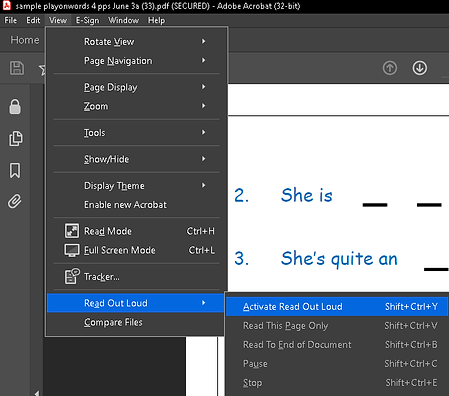
Steps to access your PDF, change Page display, and activate Read Out Loud:
-
Find the PDF in your downloads folder then click View. Figure 1.
-
Click View and set Page Display. Figure 2.
-
Click Read Out Loud and Activate feature. Figure 3.

Figure 1

Figure 2